¶ Assignment Conditions
¶ What is an Assignment Block?
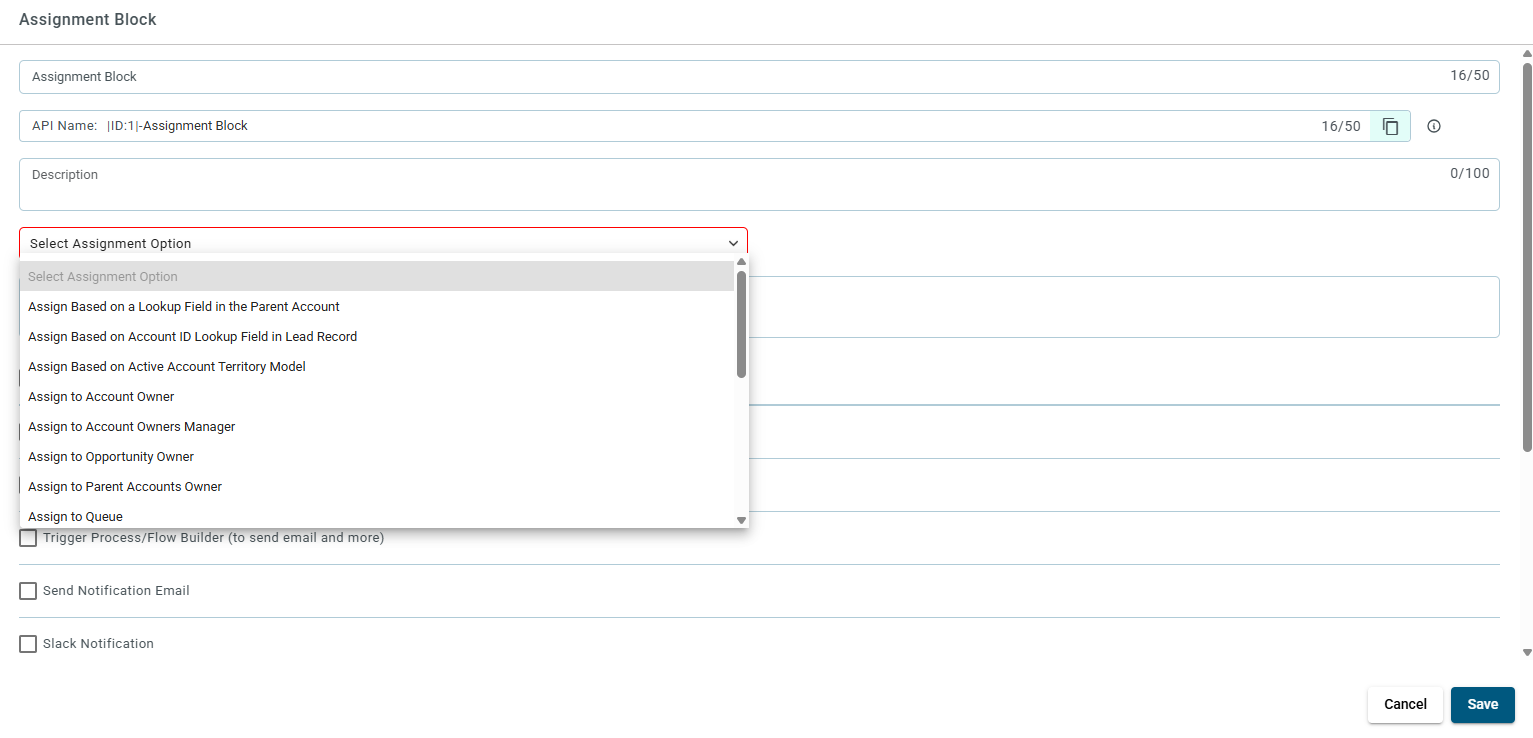
While working on any router, you can configure how leads are assigned using the Assignment block. Below are the available options:
¶ What are the assignment options?
¶ 1. Assign Based on a Lookup Field in the Parent Account
- Used to assign leads based on sales rep information in the parent account.
- Two fields appear:
- Parent Account ID Field: Field that identifies the parent account.
- Sales Rep Lookup Field on the Parent Account: Field that identifies the sales rep from the parent account.
¶ 2. Assign Based on Account ID Lookup Field in Lead Record
- Assigns lead using an Account ID from the lead record to find a matching account.
- Two fields appear:
- Account ID for Lookup: Field on the lead that stores the account ID.
- Sales Rep Lookup: Field on the account to find the sales rep.
¶ 3. Route Leads Based on Custom Object Lookup
- Uses a custom object to assign leads based on sales rep ID.
- Two fields appear:
- Field containing the sales rep ID on the custom object.
- Person to whom the lead will be assigned.
¶ 4. Assign to Account Owner
- Assigns the lead to the owner of the matched account.
- Only works if an account match is found.
¶ 5. Assign to Account Owner’s Manager
- Assigns to the account owner’s manager, if one exists and is active.
¶ 6. Assign to Opportunity Owner
- Assigns to the most recent opportunity owner of the matched account.
Opportunity can be open or closed.
Requires a matched account and a related opportunity.
¶ 7. Assign to Parent Account Owner
- Uses the parent account owner of the matched account.
- One input appears:
- Parent Account ID Field
¶ 8. Assign to Queue
- Assigns the lead to a queue.
- Select from the dropdown list.
¶ 9. Assign to Sales Rep
- Assigns the lead to a specific sales rep.
- Select from the dropdown list.
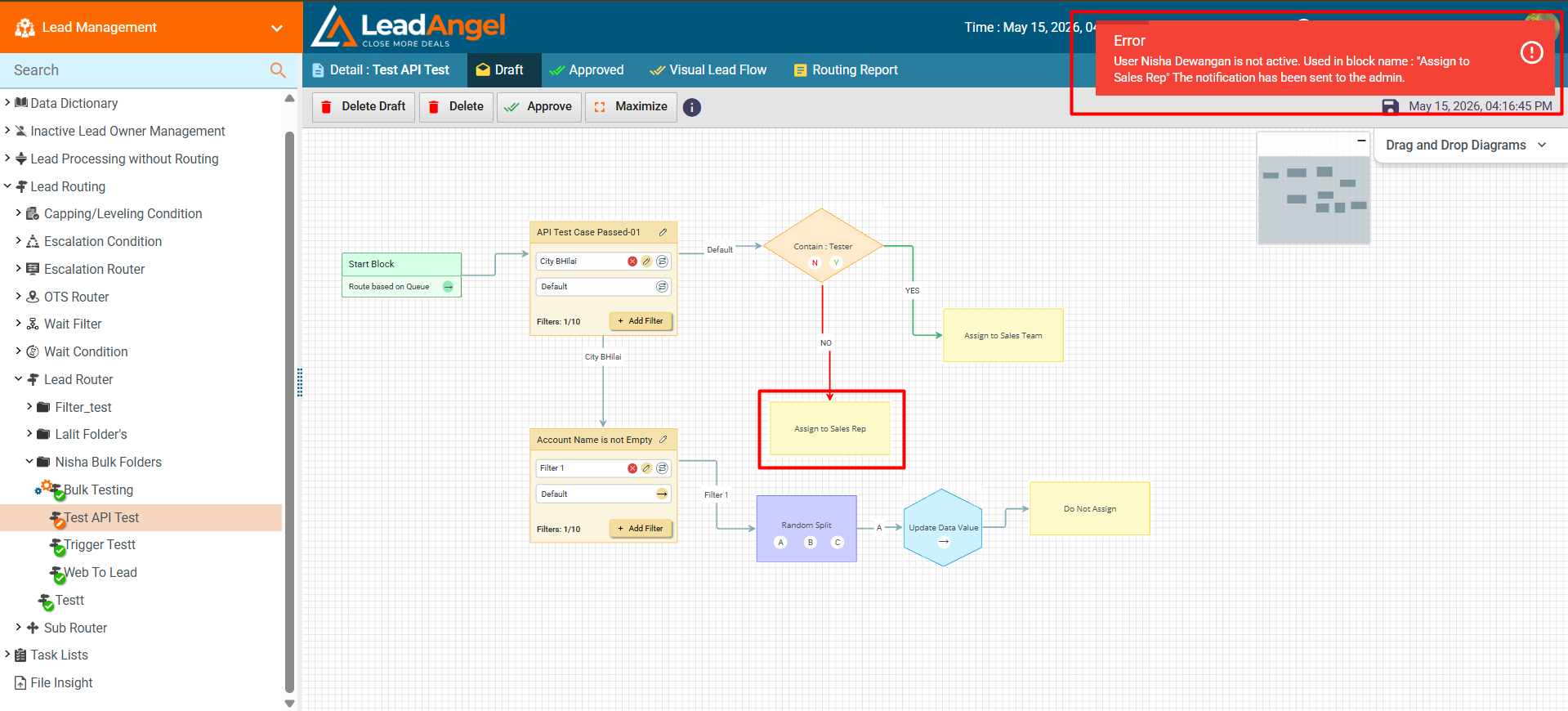
¶ What happens if “Sales Rep” is inactive in the Assignment block?
If the “Assign to Sales Rep” option is selected and the chosen sales representative in an Assignment block later becomes inactive, the router approval process will display the corresponding Assignment Block Name instead of an internal block ID.
This improvement helps administrators quickly identify and update the affected block directly within the visual router flow.
Note: This enhancement is currently applicable only to the “Assign to Sales Rep” condition.
¶ 10. Assign to Sales Rep Email Lookup on Lead
- Uses a field on the lead that contains the sales rep's email.
¶ 11. Assign to Sales Rep ID Lookup on Lead
- Uses a field on the lead with the sales rep’s CRM ID.
¶ 12. Assign to Sales Rep Lookup on Matching Account
- Uses a CRM ID lookup on the matched account.
Only works if the lead has a matching account.
¶ 13. Execute Sub Router
- Uses an approved Sub Router to assign the lead.
Sub Router must be already created and approved.
¶ 14. Assign to Sales Team
- Uses Round Robin to assign leads among sales team members.
Remembers last assigned user in the next round.
¶ 15. Assign to Weighted Sales Team
- Uses probability and weight to assign leads.
Uses a random number generator based on weights.
¶ 16. Assign Based on Active Account Territory Model
- Two fields appear:
- Select column containing assign to user role in territory
- Select column containing default owner ID - Optional Field. Can select “No Default”
- The Assign Based on Active Account Territory Model option lets you use Salesforce’s Active Territory Model to assign leads based on mapped account attributes and territory hierarchy.
- Leads are matched to the deepest territory and assigned using user roles in the territory; a default owner can be set for fallback.
- The Active Territory Model name is auto-detected, and you can configure the role-matching column and default owner in the Assignment Block.
¶ What happens if “Assign to Sales Team” or “Weighted Sales Team” is selected?
You will get an extra option:
- Assign to people with currently active working hours
- Only assigns to active users.
- If no active users:
- Lead goes to the default owner (if set)
- Or the lead is held (if Hold Lead is selected)
¶ What is “Do Not Assign”?
- Leads are not assigned.
- They are skipped from the routing flow.
- They remain in the Vyakar Queue and are reprocessed in every run.
¶ Notes
- All lookup fields must contain a valid 18-character Salesforce (SFDC) ID.