¶ Assignment Limit
Assignment Limit refers to the maximum number of leads, contacts, accounts, or opportunities that a salesperson can receive within a specific period. This limit helps distribute workload fairly among team members and prevents any individual from being overwhelmed with too many assignments.
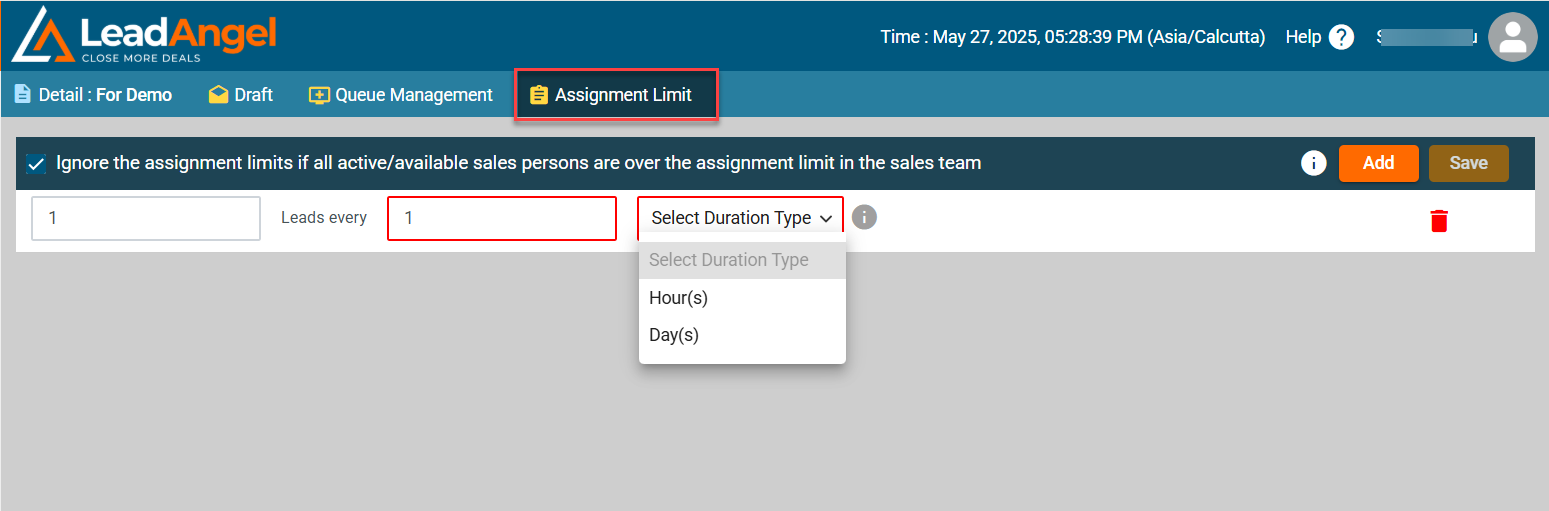
Follow these steps to configure assignment limits:
1. Navigate to the Assignment Limit Tab
- Click on the Assignment Limit tab in the top menu.
2. Add a New Assignment Limit Rule
- Click the Add button to create a new assignment limit rule.
3. Configure the Assignment Limit
- Enter the number of leads to be assigned in the Leads Every field.
- Specify the time interval by selecting Hour(s) or Day(s) from the dropdown menu.
4. (Optional) Override Assignment Limits
- Enable the checkbox "Ignore the assignment limits if all active/available salespersons are over the assignment limit in the sales team." to allow continuous lead assignment when all salespersons reach their limits.
5. Save the Configuration
- Click the Save button to apply the assignment limit.
¶ Additional Notes
- A maximum of four rows can be added to define multiple assignment limit rules.
- Use the trash icon to delete an existing rule.