¶ Detail Tab (Round-Robin Team)
In the Detail tab, you can configure the sales team's queue owner and designate a Fallback Assignee, among other checkbox options.
¶ Assign a Queue Owner and Fallback Assignee
- Click on the Detail tab.
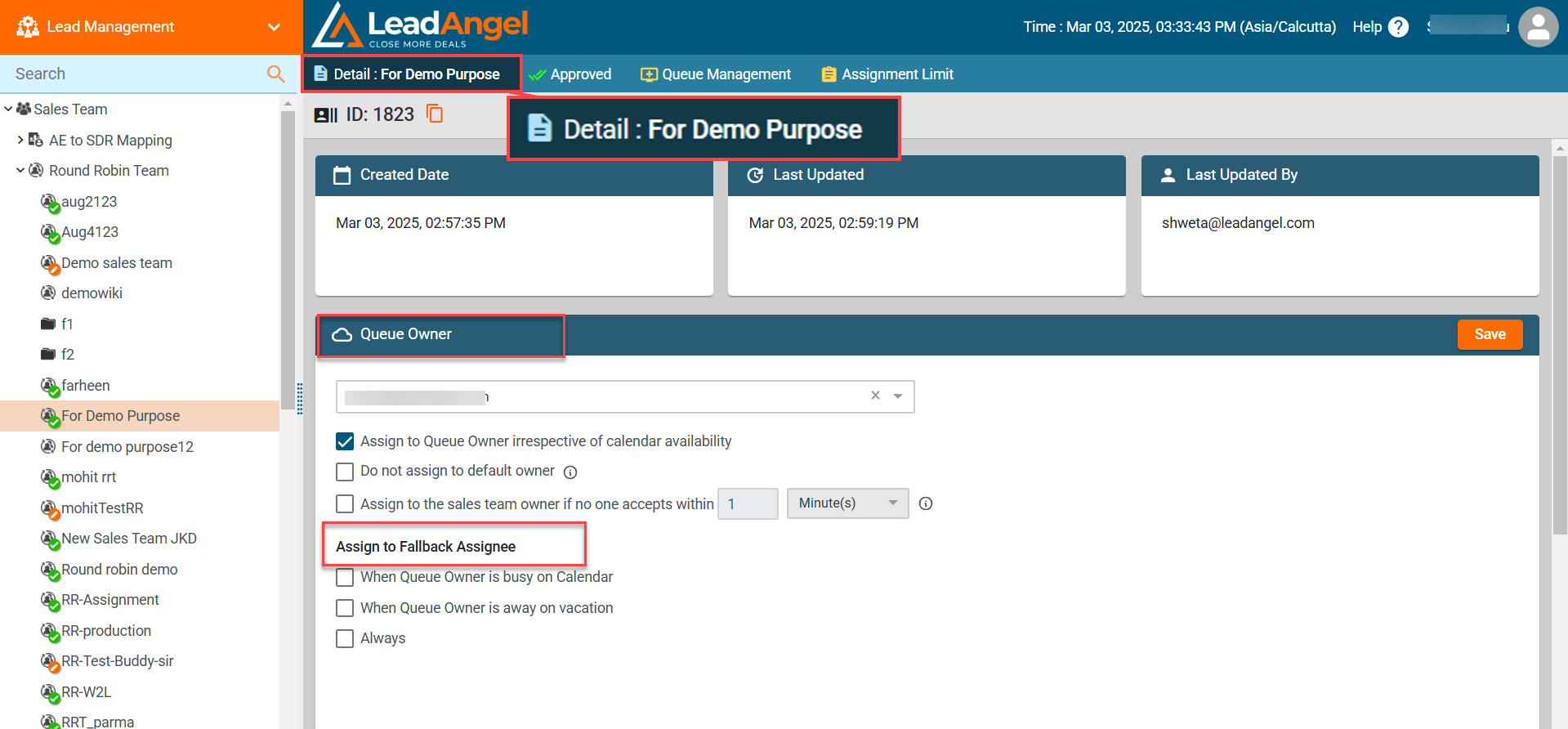
- Select a Queue Owner from the dropdown list (default: sales team creator).
- The list of queues is now available when selecting the default owner in Sales Team & Router, in addition to sales reps.
- You can now choose a queue as the default owner. This provdies greater flexibility in how leads are assigned, especially in scenarios where distribution needs to happen through a queue rather than a single user.
- Enable or disable the checkbox “Assign to Queue Owner irrespective of calendar availability” to determine if leads/accounts/contacts/opportunities should be assigned to the Queue Owner regardless of their availability.
¶ Checkbox Options for the OTS Router
¶ 1. Do Not Assign to Default Owner
Checked: If no sales team member is available, the OTS router will notify the initiator to manually route the lead to a sales team member.
Unchecked: The lead will be routed to the selected team. If no team member is available, it will be routed to the Queue Owner.
If both the Queue Owner and Fallback Assignee are unavailable, the lead will be assigned to the Default Owner.
¶ 2. Assign to the Sales Team Owner If No One Accepts Within the Set Timeframe
This option applies to the OTS Router Sales Team Assignment. When a specific time limit—such as 5 minutes—is configured, and a Slack channel is selected from the dropdown, the lead will be initially routed to that Slack channel instead of the Default Owner. If no one in the Slack channel accepts or rejects the lead within the specified timeframe, the lead will then be assigned to the sales team owner or queue owner.
¶ 3. Assign to Fallback Assignee
This enables the system to assign the Lead/Contact/Account/Opportunity to the Fallback Assignee instead of the Default Owner if both the sales reps and the Queue Owner are unavailable.
The following conditions determine when the lead is assigned to the Fallback Assignee:
When Queue Owner is Busy on Calendar: If selected, the system checks the Queue Owner’s calendar availability. If they are busy, the lead is assigned to the Fallback Assignee.
When Queue Owner is Away on Vacation: If selected, the system checks if the Queue Owner is on vacation based on calendar availability. If they are away, the lead is assigned to the Fallback Assignee.
Always: This option always assigns the lead to the Fallback Assignee.
Note: If a Fallback Assignee is not selected in user settings, the Lead/Contact/Account/Opportunity will be assigned to the Default Owner in the absence of both sales reps and the Queue Owner.
¶ Final Step
Click the Save button to apply changes.