¶ Assignment Limit
Assignment Limit refers to the maximum number of leads, contacts, accounts, or opportunities that a salesperson can receive within a specific period. This limit helps distribute workload fairly among team members and prevents any individual from being overwhelmed with too many assignments.
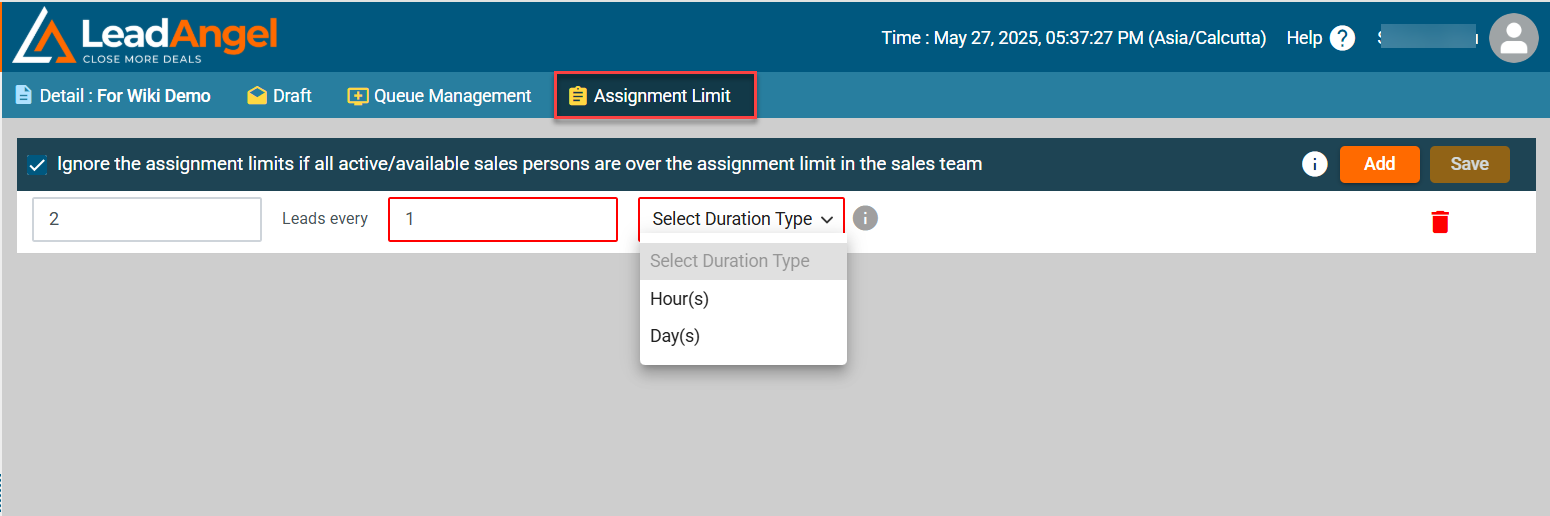
Follow these steps to configure assignment limits:
1. Navigate to the Assignment Limit Tab
- Click on the Assignment Limit tab in the top menu.
2. Add a New Assignment Limit Rule
- Click ADD to set limits (up to 4).
- Hours can be set between 1 and 23.
- Days can be set between 1 and 30.
- Approve the Team.
Note
- If the “Ignore assignment limits” box is checked, the system will bypass the limits and assign leads to the next rep in the queue.
- If the box is unchecked, excess leads will go to the active Queue Owner. If the Queue Owner is inactive or unavailable, leads will be assigned to the Default Owner of the active and approved router.