¶ Queue Management (Weighted Sales Team)
¶ Overview
Each sales team in LeadAngel has its own Queue Management settings. The Queue Owner must be a LeadAngel user, and these configurations apply wherever the sales team is used.
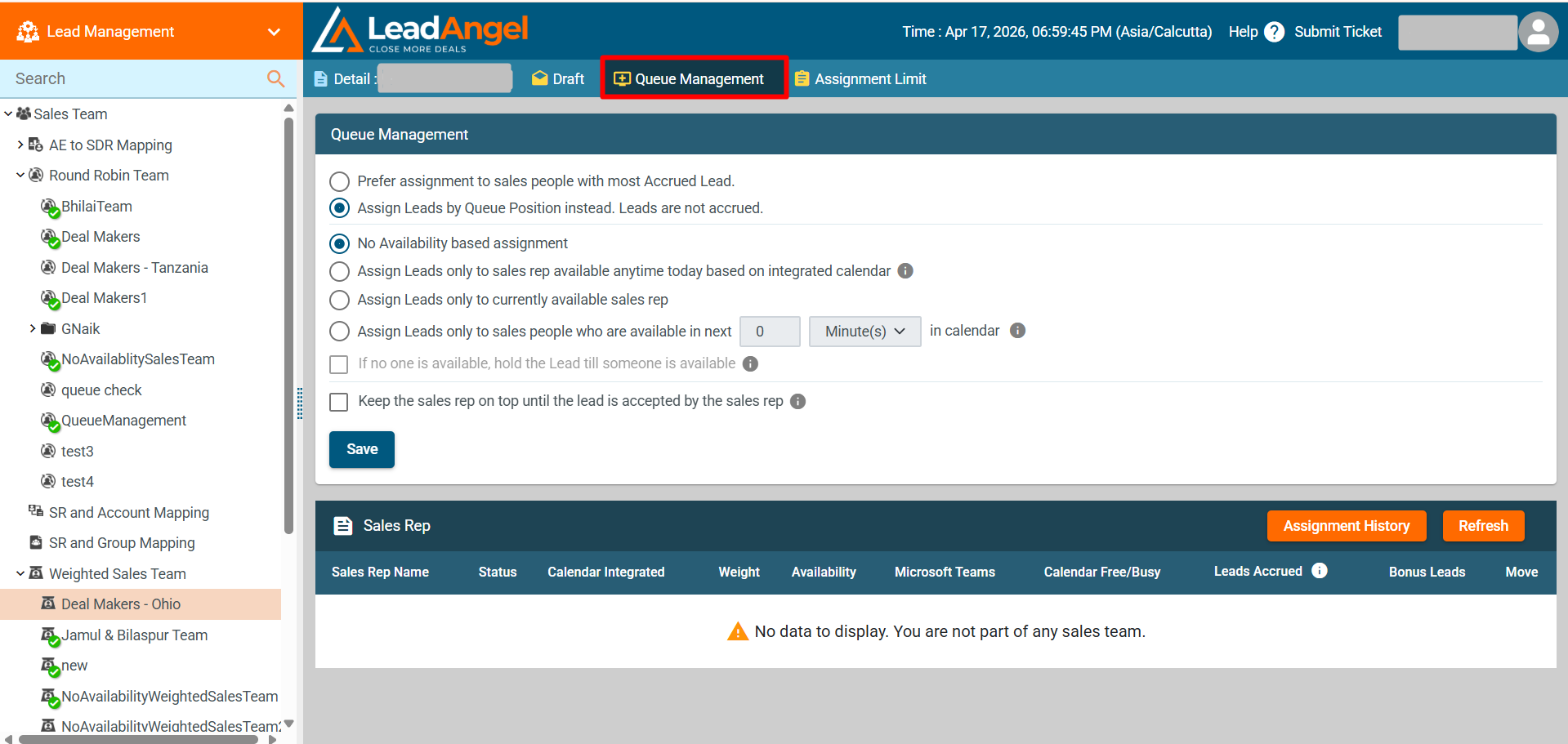
Queue Management provides five lead assignment options:
- Prefer assignment to salespeople with the most Accrued Leads
- Assign leads by Queue Position instead (Default)
¶ Lead Assignment Options
1. Prefer Assignment to Salespeople with the Most Accrued Leads
This option allows sales reps to accrue leads while inactive or unavailable. A Maximum Lead Accrued limit (between 1-99) can be set per salesperson.
¶ Assignment Logic:
- If no sales rep has accrued leads:
- The system assigns leads based on the roster sequence (top-down order).
- The roster moves to the next rep after a lead is assigned.
- If a sales rep has accrued leads:
- The system prioritizes assigning leads to them until their accrued leads are cleared.
- If a sales rep is inactive or unavailable:
- Their accrued lead count increases by one.
- The system assigns the lead to the next available rep.
- This continues until a lead is assigned.
2. Assign Leads by Queue Position (Default)
- Leads are assigned using the Weighted round robin method.
- Unavailable reps are skipped during assignment.
Sub-option: "Keep Sales Rep on the Top of the Queue Until a Lead is Assigned"
- If a rep was inactive/unavailable in the last assignment, they stay at the top.
- They receive the next available lead instead of moving down.
- Even though leads aren’t accrued, the rep stays at the top until they receive a lead.
¶ Assign Leads Only to Currently Available Sales Reps
Leads are assigned only to available sales reps based on the LeadAngel Calendar or Salesforce Profile.
Sub-options:
- Active Working Hours Based on Salesforce Profile
- Calendar-Based Availability (Only if calendar integration is enabled)
- Hold Leads Until Someone is Available (If no reps are available, leads are held)
Sales Rep Information:
Sales Rep Name: Full name as per CRM.
Status: Admins, standard users, and Queue Owners can set reps as active/inactive (this does not sync with CRM).
Calendar Integrated: If LeadAngel Calendar is integrated, availability is based on it.
Availability: Determines if the rep is available during assignment.
Calendar Free/Busy:
- Free: Sales rep is not in a meeting when a lead is assigned.
- Busy: Sales rep is already in a meeting when a lead is assigned.
- Not Available: If the system cannot fetch calendar data, the rep is marked unavailable.
Leads Accrued: Number of leads accrued (applicable only in lead router).
Bonus Leads: Leads assigned via web-to-lead forms if the user doesn’t schedule a meeting within the rollback time.
Move: Adjust queue position using the drag-and-drop icon.
¶ Boosting a Sales Rep
- Boosting moves a sales rep to the top of the queue
- Only one rep can be boosted at a time
- Boosted reps remain at the top until assigned a lead
- After assignment, they move to the bottom
¶ Assignment History
- Displays a full log of lead assignments per sales rep
¶ Refresh & Reset Options
- Refresh: Updates and reloads the queue order
- Reset: Restores the originally configured queue settings